


Past Results
Last updated:
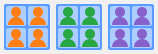
The Past Results feature lets you take the results of earlier groupings into account in your next grouping. When you select results that have already been run, members who were in the same group in those results are placed in different groups where possible.
Round 1
Round 2
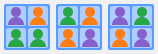
This is useful when you run grouping several times with the same members. For example, you can use it in situations like these.
- Rotate seats or teams on a regular basis
- Run group work multiple times in a workshop or training session
- Let participants at a networking event be grouped with as many different people as possible
How to set up
Canvas View
To use past results, you first need to run the grouping at least once and have a result.
There is a flag icon to the left of each result name. Click or tap it to toggle whether the result is selected.
Icon State Selected Not selected - The results you select are also shown in [Past Results].
- You can also edit which past results are used from (Edit past results to be used).
Run the grouping. Members who were in the same group in the selected results are placed in different groups where possible.
Past results work exactly the same as setting (Distribute attributes evenly) on Attributes and giving members who were in the same group the same type.
© 2026 Smart Group Maker
/ Privacy Policy / Contact Smart Group Maker
Last Updated at 11/21/2026, 1:23:19 PM UTC
© 2026 Smart Group Maker