


Mixing Up Groups Over Several Rounds So People Meet Different People
Last updated:
In study groups, workshops, club activities, networking events, classroom activities, and similar settings, it is common to change the groups several times with the same members.
In such repeated groupings, the aim is usually to let participants interact with as many people as possible, so it is desirable that each time, people are placed in a group with different people where possible.
Keeping track of who has been grouped with whom in the past, while building groups that let everyone meet as many different people as possible, is surprisingly tedious.
This page shows, through several cases, how to set up repeated groupings so that, round after round, people are grouped with different people where possible.
- When you keep grouping within the app
- When earlier results are not in the app (such as last month’s meetup)
Example scenario
The two cases below share the following scenario.
- You are organizing a study group that meets once a month. In each session, participants split into groups for a discussion. There are 24 participants, and each time you divide them into six groups of four.
This scenario is just one example. Replace the type of event, the number of participants, and the number of groups with your own. The same approach also works when you change groups several times within a single event.
1. When you keep grouping within the app
The Past Results feature is designed for this purpose. After you run a grouping, a simple setting makes the next grouping place people who were in the same group before into different groups where possible, giving you groups with new combinations of people.
- If the first grouping has no special conditions, start with a simple random grouping. If you are not yet familiar with the basics of Smart Group Maker, see Tutorials. If you have results from groupings made before you started using Smart Group Maker, see 2. When earlier results are not in the app (such as last month’s meetup).
For the second grouping, reflect the first result so that members who were in the same group in the first grouping are placed in different groups where possible.
This is easy to set up. Click or tap (Use as past results) on each result to choose whether that result is taken into account. Results you have chosen to take into account are also shown in [Past Results].User GuideWith this setting in place, run the second grouping. Compare the first and second results, and check whether any two people were in the same group both times.
In this example, such pairs can almost always be avoided (in rare cases, some repeats may remain).
Depending on the situation, such as when the number of groups is small compared with the size of each group, or after many rounds, repeats may not be avoidable completely. These situations are explained here.
From the third grouping on, you can keep separating people who have already been in the same group by also selecting the earlier results as past results.
If you set the flag on both the first and second results, the third grouping is formed so that people are grouped, where possible, with those they did not meet in either round.
You can also deliberately leave some flags unset. As you repeat groupings, there are fewer people left to be grouped with, so a grouping that takes all earlier results into account can no longer be satisfied (you can still run it, but selecting the results has little effect).
In that case, selecting only the last one or two results helps you avoid being grouped with the same people repeatedly within a short span.
When some people unavoidably end up in the same group in both the first and second groupings
In some situations, it is unavoidable in principle that some people end up in the same group in both the first and second groupings. For example, consider dividing 20 people into two groups of 10 (Team A and Team B).
If you run this grouping twice, each member falls into one of the following four patterns.
| # | Round 1 | Round 2 |
|---|---|---|
| 1 | Team A | Team A |
| 2 | Team A | Team B |
| 3 | Team B | Team A |
| 4 | Team B | Team B |
Because the 20 people are split among four patterns, at least one pattern must contain five or more people, and those people are in the same group in both rounds.
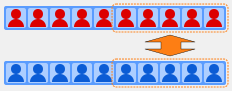
Even in such cases, the Past Results feature can reduce the overlap. In this example, you can arrange the second grouping so that five people fall into each pattern (that is, half of each team is swapped).
2. When earlier results are not in the app (such as last month’s meetup)
If you have results from groupings made outside Smart Group Maker, such as last month’s meetup, you can set those groups as an attribute to get the same effect as the Past Results feature.
Set up the attribute as follows, then run the grouping.
- Add one attribute and set it to (Distribute attributes evenly).
Add each earlier group as a type.
Set each member’s earlier group as their type.
Past results work exactly the same as setting (Distribute attributes evenly) on Attributes and giving members who were in the same group the same type.
When there are new participants who were not there last time
How should you set up members who were not there last time, such as new joiners?
There are two possible approaches.
- Leave them without any type
- Add “Did not attend last time” as a type, and set that type for the relevant members
This difference affects the result.
With the first approach, there is no effect that spreads out the people who did not attend last time. With the second approach, people who did not attend last time are also placed in different groups where possible.
You may want to avoid having new or unfamiliar people gather in the same group. In that case, we recommend the second approach.